Tesla's Emergency Brake: How and When to Use It
Although not immediately apparent, every Tesla is equipped with an emergency (parking) brake — a useful safety feature in urgent situations. Unlike conventional mechanical handbrakes, Tesla’s parking brake is electronically actuated and integrated with the vehicle’s software and braking systems, operating differently from traditional cars.
All Tesla vehicles include an emergency (parking) brake, though its operation isn’t always obvious. Tesla’s parking brake holds the rear brake pads against the rotors rather than using a separate mechanical lever, which can be useful in an emergency.
How to enable the emergency/parking brake
- Vehicles with a gear stalk: Press and hold the Park button at the end of the right stalk on the steering column. When the brake is applied, the on-screen indicator will display a P symbol or the word PARK (U.S. vehicles).
- Vehicles without a gear stalk: Tap and hold the Park icon in the top-left corner of the touchscreen.
How to disable the emergency brake
- Shift into Drive or Reverse as normal; the emergency brake will automatically release.
Backup gear selector (if the touchscreen is unresponsive)
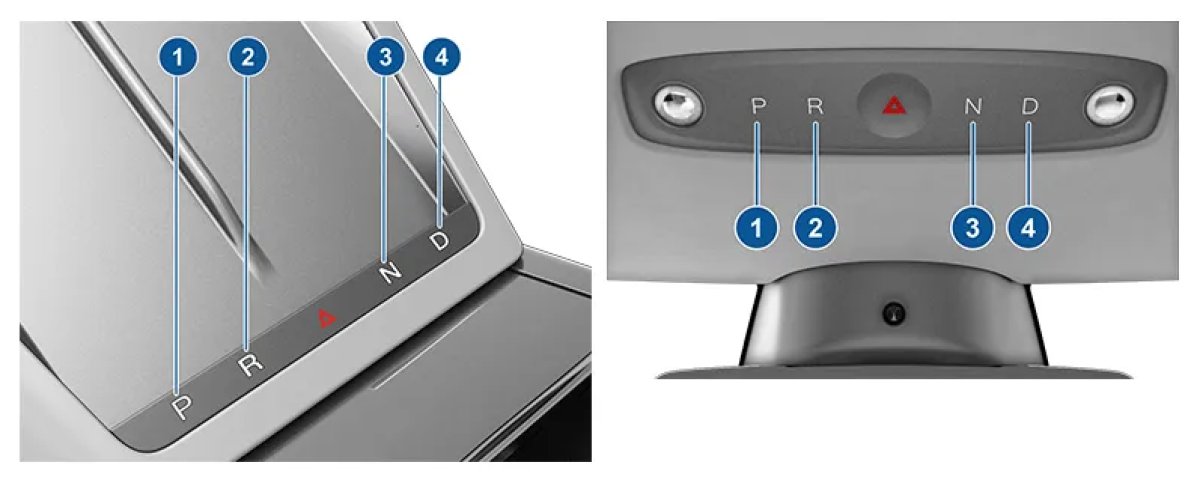
- Model 3 and Model Y: Press near the hazard lights button to activate the backup gear selector. Use it to change gears or press and hold Park to enable the parking brake.
- Model S and Model X: Press the area beneath the wireless phone chargers to change gears or enable the parking brake.
Emergency braking while driving
- If you press the parking brake control while the vehicle is moving, the car will apply its normal brakes and cut drive torque from the motor while the control is held. The parking-brake mechanism will not engage until the vehicle has stopped.
Two videos are available that demonstrate using the e‑brake when parking and while driving.
How to enable the emergency/parking brake
- Vehicles with a gear stalk: Press and hold the Park button at the end of the right stalk on the steering column. When the brake is applied, the on-screen indicator will display a P symbol or the word PARK (U.S. vehicles).
- Vehicles without a gear stalk: Tap and hold the Park icon in the top-left corner of the touchscreen.
How to disable the emergency brake
- Shift into Drive or Reverse as normal; the emergency brake will automatically release.
Backup gear selector (if the touchscreen is unresponsive)
- Model 3 and Model Y: Press near the hazard lights button to activate the backup gear selector. Use it to change gears or press and hold Park to enable the parking brake.
- Model S and Model X: Press the area beneath the wireless phone chargers to change gears or enable the parking brake.
Emergency braking while driving
- If you press the parking brake control while the vehicle is moving, the car will apply its normal brakes and cut drive torque from the motor while the control is held. The parking-brake mechanism will not engage until the vehicle has stopped.
Two videos are available that demonstrate using the e‑brake when parking and while driving.

